

Where do I find the QR-IBAN for my St. Galler Kantonalbank account?

Where do I find the QR-IBAN for my St. Galler Kantonalbank account?

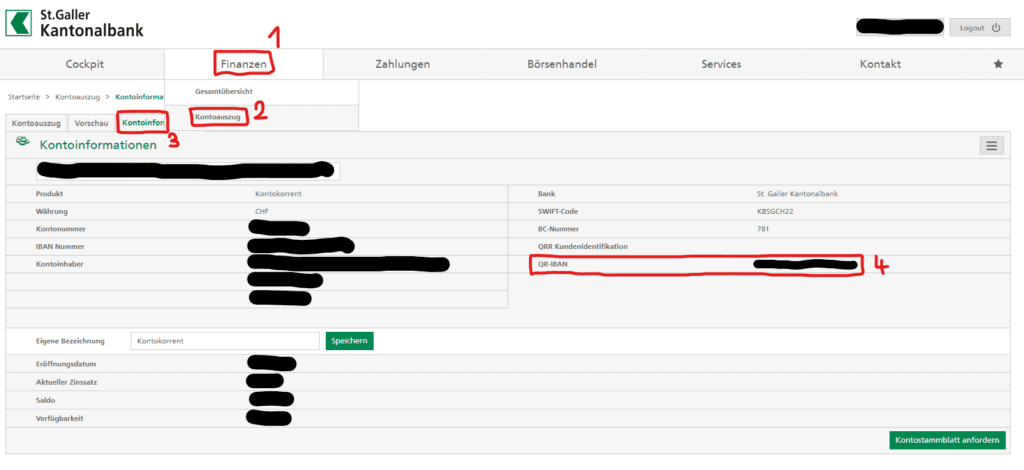
To create a QR-bill, a QR-IBAN is needed. You will find it in your St.Galler Kantonalbank E-Banking.

Go To:

1) Finances (Finanzen)

2) Bank statement (Kontoauszug)

3) Your QR-IBAN Number will be under Account Information (Kontoinformationen) (4)
This image has an empty alt attribute; its file name is QR-IBAN-1024x470.png

Find out more about QR-bills and where to input the QR-IBAN number in Atlanto in the FAQ QR-Invoice – What to consider

Still have some questions? Back to the FAQs

SIMILAR FAQs

Colors in Bank Transactions

You can upload your bank transactions into Atlanto.…

How the posting logic works for partial payments

Let’s use an example — a VAT-exempt invoice…

Document Types in Atlanto

Document Types in Atlanto Create various documents under…